Recipe: filter a table by state
For: implementers. Setup: ModularIoT.
Result: a State filter above the dashboard. Choosing a state makes the table show only those rows. The summary keeps showing every state.
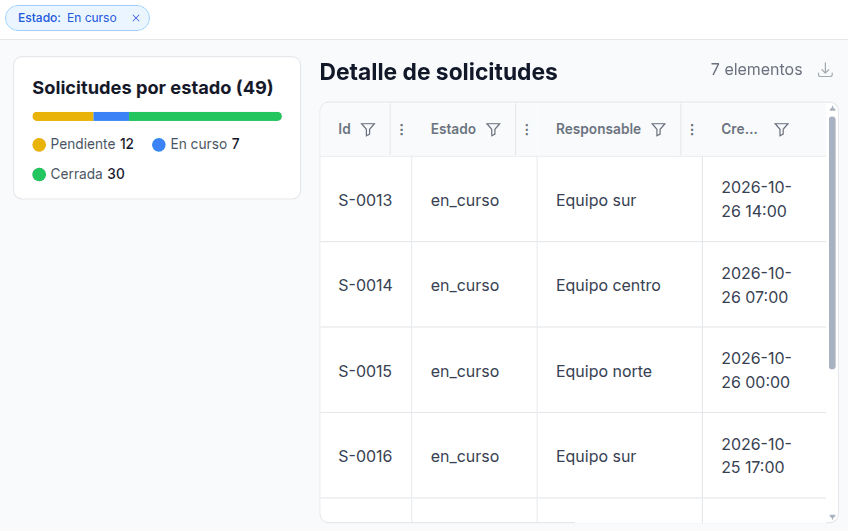
Clicking a chart or a bar does not filter the table (#2234 ). This recipe uses a dashboard filter.
Before you start
| Step | Where |
|---|---|
| Save each SQL query with a name | Settings › Connections › BigQuery › + New › Save |
| Add a saved query to the dashboard | With Edit Mode on: settings menu (gear) › Saved queries › Add query. Connection: your BigQuery connection. Operation: the SQL query’s name |
| Add a widget | With Edit Mode on: Add Widget |
The full walkthrough is in Build your first dashboard.
Queries
Detail. Save it as detalle_solicitudes. In Parameters, select Declare @estado (type STRING):
SELECT
  id, estado, responsable,
  FORMAT_TIMESTAMP('%Y-%m-%d %H:%M', creada_en, 'America/Santiago') AS creada
FROM `my-project.operations.solicitudes`
WHERE (IFNULL(@estado, '') = '' OR estado IN UNNEST(SPLIT(@estado, ',')))
ORDER BY creada_en DESC
LIMIT 500
Filter options (optional), so the list of states comes from the data. Save it as estados_opciones:
SELECT DISTINCT estado,
  CASE estado WHEN 'pendiente' THEN 'Pending' WHEN 'en_curso' THEN 'In progress' ELSE 'Closed' END AS etiqueta
FROM `my-project.operations.solicitudes`
ORDER BY CASE estado WHEN 'pendiente' THEN 1 WHEN 'en_curso' THEN 2 ELSE 3 END
Steps
-
Turn on Edit Mode. Add the saved query Result name
detalle, Operationdetalle_solicitudes, with these parameters:{ "estado": { "kind": "filter", "key": "estado", "defaultValue": "" } } -
Add a Data Table V2 with Data Source Planner and Variable
detalle. -
If you use the options query, add it with Result name
estados, Operationestados_opciones, Parameters (JSON){}. -
Settings menu › Filter Bar › Add filter:
Setting Value Filter type Select Display label StateParameter key estadoAllow a single selection Checked for one state at a time. Unchecked for several Options source Manual (typed by hand) with Pending/pendiente,In progress/en_curso,Closed/cerrada. Or the queryestados, with Value columnestadoand Label columnetiqueta. If no columns appear, wait for the dashboard to load and open Filter Bar again -
Save in the panel and turn off Edit Mode.
| Part | Does |
|---|---|
"key": "estado" in the binding | Must match the filter’s Parameter key |
"defaultValue": "" | With no filter, the query receives empty text and returns everything. BigQuery needs every parameter |
SPLIT(@estado, ',') | With several options chosen, the value arrives as pendiente,en_curso |
The page address keeps the filter (?estado=en_curso). You can share that link.
To filter the summary too
Add the same WHERE condition to the summary query, declare @estado (type STRING) in the editor and use the same binding in its Parameters (JSON). With one state chosen, the 100% bar has a single color.