Locations that need review
For: implementers and developers.
You will learn:
- what statuses a location has and when it is tried again;
- the three ways out for a place that needs review: correct the data, place it by hand or reject it;
- what to do when the declared district is wrong.
The statuses
resolutionStatus | Means | Does the feed try it again? |
|---|---|---|
null | Never tried | Yes, when the feed sends a site |
resolved | Has a point and a geofence | No |
needs_review | A reliable point is missing. The reason is in resolutionNote | Yes, if the feed sends a different site |
rejected | Someone decided it cannot be located | No |
A location with a linked geofence is not tried again from the feed either, whatever its status. A resolved location that goes back to review keeps its previous geofence, and trips keep using it.
Through the API, POST /trips/locations/resolve resolves the place whenever you ask, in any status.
Where to see them
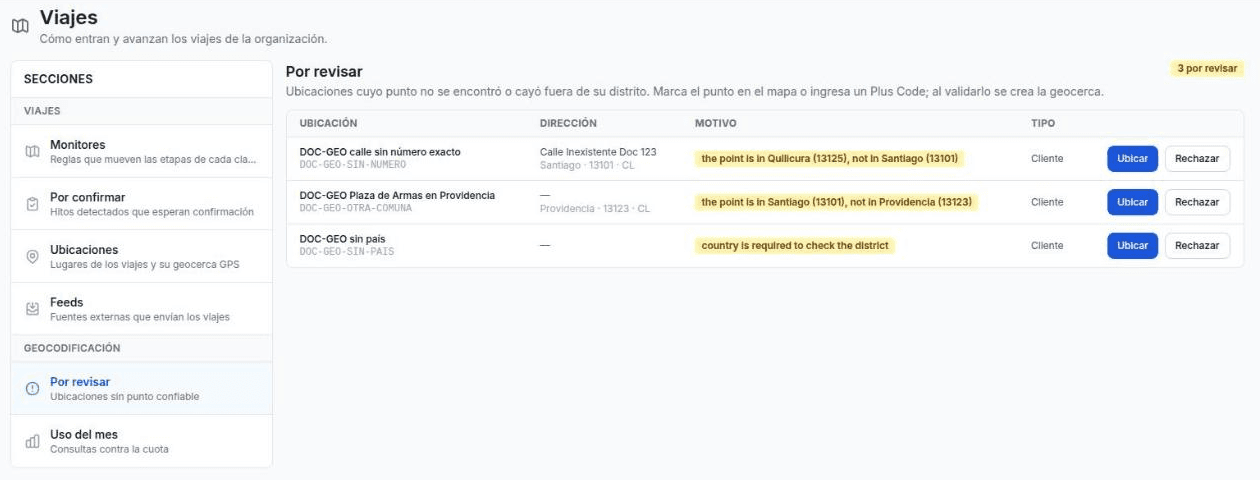
In Settings › Trips › To review (Geocoding group). The list shows the place, its address, its district (District column) and the reason.
Through the API:
curl -s "$MIOT_API/api/v1/orgs/$MIOT_ORG/trips/locations?status=needs_review&size=50" \
  -H "Authorization: Bearer $MIOT_TOKEN"
Way out 1: correct the data and resolve again
If the reason is the district, the country or a short Plus Code without a district, correct the data at the source and resolve again. Through the API, send only what changes:
{ "externalCode": "DOC-GEO-PC-SHORT", "districtCode": "150122", "plusCode": "VXHC+H4" }The place goes from needs_review to resolved. If the place comes from a feed, correct the spreadsheet: the feed tries it again when the site changes.
Pitfall: correcting only the address does not work if the place already has a stored point. The new resolution uses the stored point as a Plus Code and does not look up the address:
{ "externalCode": "DOC-GEO-SIN-NUMERO", "address": "Av. Libertador Bernardo O'Higgins 1058" }{ "resolutionSource": "plus_code", "resolutionStatus": "needs_review",
"resolutionNote": "the point is in Quilicura (13125), not in Santiago (13101)" }In that case, place the point by hand (way out 2).
Way out 2: place it by hand
A person marks the point. In To review, click Place, mark the point on the map or type a Plus Code, and click Validate and create geofence.
The platform checks the point against the place’s district, with the same 500 m rule. If it passes, it creates a geofence with the radius of the place type and the source is manual. If it does not pass, it rejects the point and shows the reason.
Through the API:
curl -s -X PUT "$MIOT_API/api/v1/orgs/$MIOT_ORG/trips/locations/$LOCATION_ID/point" \
  -H "Authorization: Bearer $MIOT_TOKEN" -H "Content-Type: application/json" \
-d '{ "plusCode": "47RFH86X+VR" }'| Response | When |
|---|---|
200 with the location, resolutionSource: "manual" | The point falls in the district |
400 with {"error": "the point is in Quilicura (13125), not in Santiago (13101)"} | The point falls outside |
404 | The location does not exist |
400 with the geofence is managed outside this location | The geofence with the place’s code was not created by manual review |
400 with another note | Invalid Plus Code, no point, or one of the district notes |
409 with the GPS database is not configured | The organization has no GPS database |
A point placed by hand is not linked to another geofence: the place gets its own, with the location’s id as its code. If someone places it again, that same geofence moves.
When the declared district is wrong
The Place dialog does not let you change the district or the country. If the site declares Providencia and the place is in Santiago, any correct point is rejected:
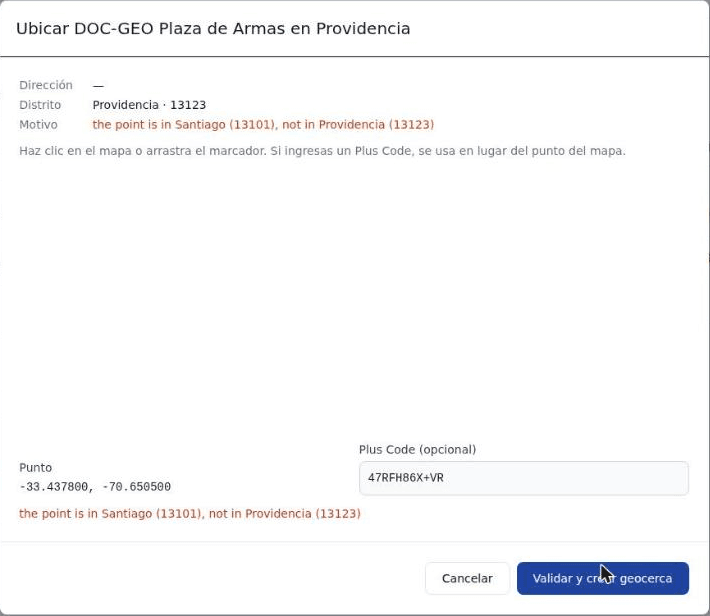
Correct it through the API. Send the correct district together with the point:
{ "districtCode": "13101", "plusCode": "47RFH86X+VR" }{ "district": "Santiago", "geofenceId": 1214,
"resolutionSource": "manual", "resolutionStatus": "resolved" }If the location has no country, add "country": "CL" to the body.
Way out 3: reject it
If the place cannot be located (a test code, a place that no longer exists), reject it with a note. In To review, click Reject and type the reason. Through the API:
curl -s -X POST "$MIOT_API/api/v1/orgs/$MIOT_ORG/trips/locations/$LOCATION_ID/reject" \
  -H "Authorization: Bearer $MIOT_TOKEN" -H "Content-Type: application/json" \
  -d '{ "note": "Test place with no country" }'
The status changes to rejected and the point and the geofence stay as they were. The feed does not try it again. To locate it again, use POST /trips/locations/resolve or PUT /point.
Common reasons
| Reason | What to do |
|---|---|
country is required to check the district | Add the country |
district … is ambiguous in PE; send its code | Send districtCode |
the point is in X, not in Y | If the district is wrong, correct it. If the point is wrong, place it by hand |
mapbox found only street, not an address | The address has no number or the provider does not know it. Place it by hand |
geocoding: the organization used its 1000 geocoding resolutions for this month | The quota is used up. Place it by hand or ask for more quota |
geocoding: this organization has no geocoding connection; a platform owner adds it in Settings › Connections | Ask a platform owner for the geocoding connection |
The full list is in Review reasons.
Summary
needs_reviewstores the point, if there is one, and the reason. It does not create a geofence, and it does not remove the one the place already had.- Correct the data and resolve again, place the point by hand, or reject the place.
- If the declared district is wrong, correct it through the API: the dialog does not change it.