Data Table V2
For: implementers. componentId: data_table_v2. Setup: setting names match the ModularIoT web app.
Shows rows in a table. Viewers can filter and sort columns, change their width and export to CSV.
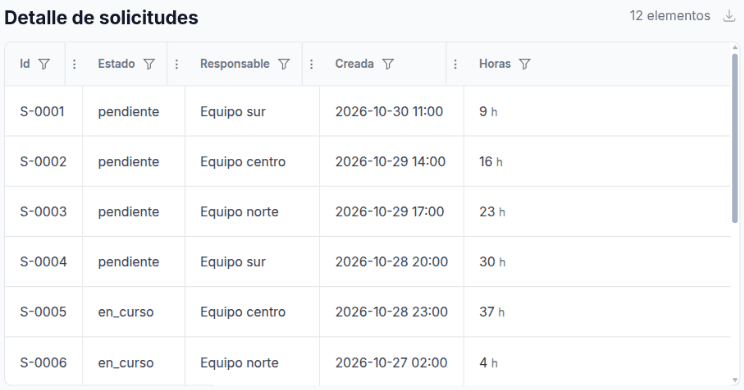
Data it reads
It reads all the rows of its query. Each column shows a template evaluated on each row: {{row.estado}}.
SELECT
  id, estado, responsable,
  FORMAT_TIMESTAMP('%Y-%m-%d %H:%M', creada_en, 'America/Santiago') AS creada_en,
  CAST(horas AS STRING) AS horas
FROM `my-project.operations.solicitudes`
ORDER BY creada_en DESC
LIMIT 500
When you choose the query in Variable, the table columns are replaced by the query’s columns, with labels generated from the names (creada_en → Creada En).
Variants
| Variant | Settings | Query shape | Screenshot |
|---|---|---|---|
| Basic | Columns with {{row.column}}; Suffix h on Horas | One row per record | Basic |
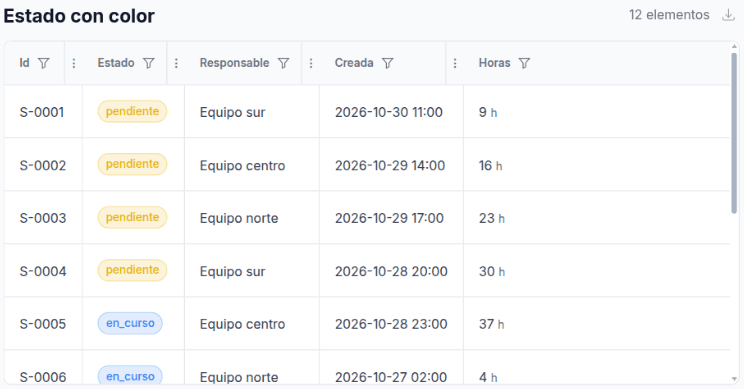
| State with color | Estado column with type badge and color rules (paintbrush) | The same | State with color |
| Colored rows | Coloring: Horas greater than 30 → red | The same | Colored rows |
| Row actions | Utilities › Add action | A column with the id for the link | Row actions |
Basic
State with color
-
Choose the query in Variable first. Choosing it later replaces the columns and drops their colors.
-
On the Estado column card, type
badgein the first field under the key. -
Turn on the paintbrush and add one rule per state:
Operator Value Color =pendienteeab308(yellow)=en_curso3b82f6(blue)=cerrada22c55e(green)
Rules compare the text the cell shows. If the query turns en_curso into In progress with CASE, write In progress in the rule.
Colored rows
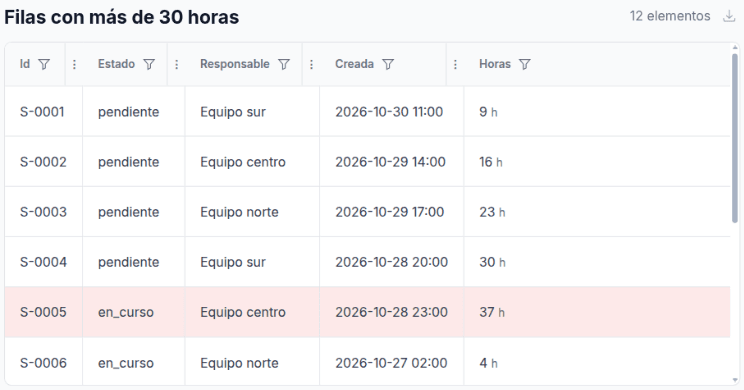
Pitfall: Coloring rules added from the UI are not applied: the widget saves rowColorRules.enabled: false and the section has no switch. Write "enabled": true in the document (Import and export).
Row actions
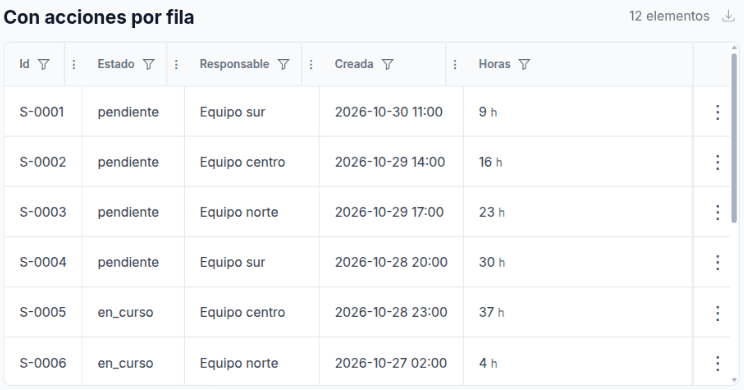
| Action | Used by |
|---|---|
| The first one (Primary action) | Clicking the row. Ctrl or Cmd + click opens another tab |
| The others (Secondary actions) | The three-dot menu and right-click on the row |
The link accepts templates: /app/en/requests/{{row.id}}. Only http, https, mailto, tel or relative links are allowed.
Settings
| Section | Setting | Document key | Effect |
|---|---|---|---|
| General | Title | title | Plain text. No templates. Also the CSV file name |
| General | Row count | showRowCount | ”12 items”. Counts rows after filters |
| General | Column dividers | showColumnDividers | Lines between columns |
| General | Show export | showExport | CSV download button |
| General | Striped rows | striped | Alternating background |
| Utilities | Add action | rowActions[]: name, link, target | See Row actions |
| Columns | Key | columns[].key | Cell template: {{row.estado}} |
| Columns | Card title | columns[].label | Header |
| Columns | First text field | columns[].type | How it is drawn: text, badge, signed, progress |
| Columns | Second text field | columns[].dataType | Type for the filter: text, number, date, enum, boolean. Empty: detected |
| Columns | Suffix | columns[].decorator | Small text after the value. Not in the CSV |
| Columns | Paintbrush | colorRulesEnabled, colorMap[] | Text or badge color by value |
| Columns | Question mark | descriptionEnabled, description | Help on the header (Markdown) |
| Columns | Pin | sticky | Freezes the column on horizontal scroll. Edge columns only |
| Coloring | Add rule | rowColorRules | Row background color |
| Data Provider | Data Source, Variable | dataMode, plannerVariableName, rows | In static mode, rows go in rows |
Column types
type | Drawn as |
|---|---|
text | Text. If the value has a line break, the first line is bold |
badge | Badge. Takes the color of the matching rule |
signed | Number in red when negative, orange from 0 to 999, green from 1000 |
progress | Bar from 0 to 100 with the number |
To format numbers or dates, use template functions in the key: {{formatNumber row.amount prefix="$"}}. See Templates.
What viewers can do
| Action | How | Saved |
|---|---|---|
| Filter a column | Funnel on the header. Search, value list, number or date range | No |
| Sort | Click the header of a sortable column | No |
| Change the width | Drag the three dots in the header; Enter or double-click fits | Only in Edit Mode |
| Export | Download button › CSV | — |
The CSV holds the visible rows after filters and sort, separated by ;, in UTF-8.
Filtering and sorting work when the column key is {{row.column}}. With a function ({{formatDate row.date}}), that column’s filter and sort have no effect. Format in the query if you need both.
Full example
{
  "componentId": "data_table_v2",
  "config": {
    "title": "Detalle de solicitudes",
    "showRowCount": true,
    "showColumnDividers": true,
    "showExport": true,
    "dataMode": "planner",
    "plannerVariableName": "detalle",
    "columns": [
      { "key": "{{row.id}}", "label": "Id", "type": "text" },
      {
        "key": "{{row.estado}}", "label": "Estado", "type": "badge", "colorRulesEnabled": true,
        "colorMap": [
          { "operator": "equals", "value": "pendiente", "color": "eab308" },
          { "operator": "equals", "value": "en_curso", "color": "3b82f6" },
          { "operator": "equals", "value": "cerrada", "color": "22c55e" }
        ]
      },
      { "key": "{{row.responsable}}", "label": "Responsable", "type": "text" },
      { "key": "{{row.horas}}", "label": "Horas", "type": "text", "decorator": "h" }
    ],
    "sort": { "enabled": true, "columns": ["{{row.id}}", "{{row.horas}}"] },
    "rowColorRules": {
      "enabled": true,
      "rules": [{ "column": "{{row.horas}}", "operator": "greater_than", "value": "30", "color": "ef4444" }]
    }
  }
}
Limits
| Limit | Alternative |
|---|---|
| Draws every row, no paging. More than 5,000 rows makes the query fail | Limit in the query (LIMIT 500) |
| Sortable columns cannot be chosen in the UI | Write sort.columns in the document |
| Choosing the query replaces the columns and drops colors, suffixes and descriptions | Choose the query before setting up the columns |
| Coloring rules added in the UI are not applied | "enabled": true in the document |
A BigQuery TIMESTAMP shows as seconds in scientific notation (1.7933364E9) | FORMAT_TIMESTAMP in the query |
Values must be text ("30", not 30) for filtering and sorting | Quote the values in rows. Saved queries already return text |