Assign an organization’s quota
For: platform owners. Setup: ModularIoT.
Only provider calls count. Geofence, Plus Code, coordinates, internal addresses and cache use no quota.
Check the plan
Open Settings › Platform and, in the Geocoding group at the end of the menu, choose Plan.
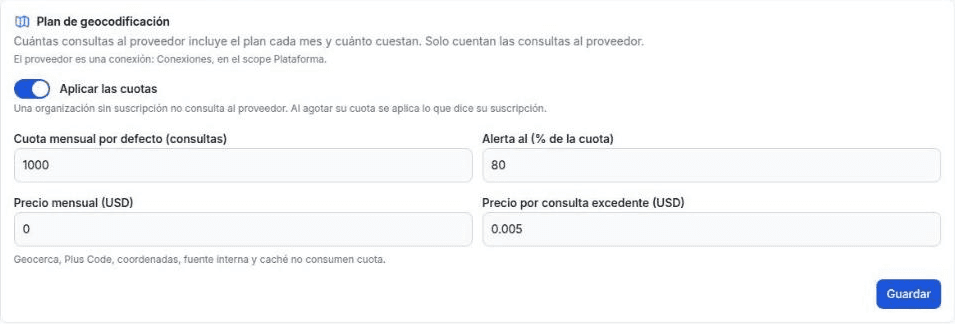
| Field | What it sets |
|---|---|
| Apply the quotas | On: an organization without a subscription does not call the provider, and when its quota runs out, what its subscription says applies. Off: no call is refused, but usage is recorded and shown |
| Default monthly quota (calls) | Calls included for a subscription without its own quota |
| Alert at (% of the quota) | Percentage at which the alert is published, once per month |
| Monthly price (USD) | What each subscribed organization pays per month |
| Price per call over the quota (USD) | What each call over the quota costs, only with Charge overage |
A change applies to the whole current month. Closed months keep the terms they had at the close.
Assign the quota
Choose Organizations in the same group and click Assign quota.
| Field | What to enter |
|---|---|
| Organization | Search for it by name, identifier or RUT |
| Monthly quota | Empty: the plan’s. A number: that organization’s own quota |
| When the quota is used up | Send to review: stops calling and the places wait for review. Charge overage: keeps calling and charges each extra call. It applies only with Apply the quotas on |
To change it later, click the pencil on the row.
Follow usage
The table shows each organization with a subscription or with usage in the month:

| Column | What it shows |
|---|---|
| Used / quota | The month’s provider calls and the quota. Shows plan’s when the organization uses the plan’s quota |
| Cache | Percentage of resolutions answered by the cache |
| Provider cost | Sum of the cost per call of the month’s calls. Only the platform owner sees it |
| Charge | Monthly price plus overage |
| When used up | What happens when the quota runs out |
The filters at the top choose the month, the quota status (normal, on alert, used up) and the mode.
The month is the calendar month in UTC. In mainland Chile, the geocoding month changes at 21:00 or 20:00 on the last day, depending on summer or winter time.
What the organization sees
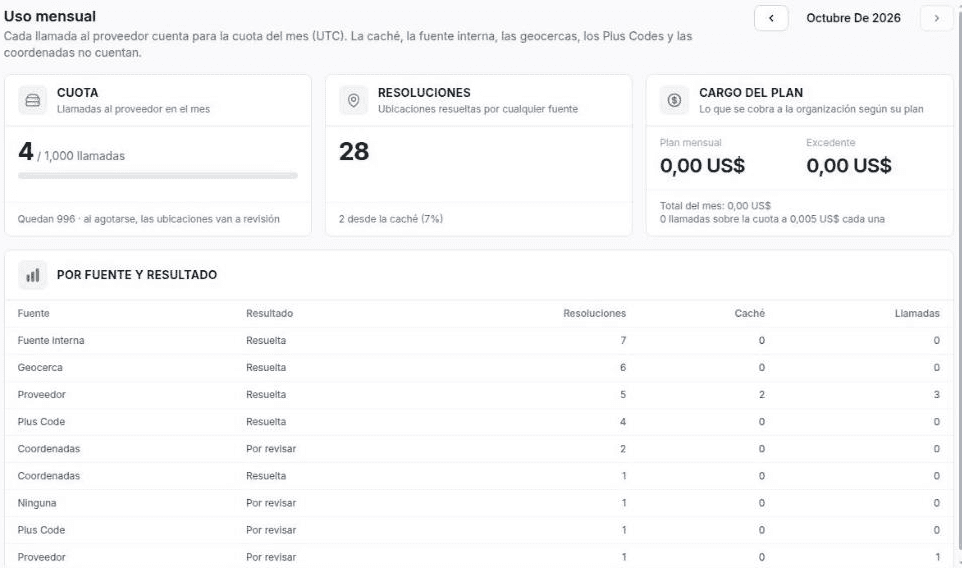
The organization owner sees its quota, its resolutions and its charge in Settings › Trips › Monthly usage. It does not see the provider’s cost.
Through the API
| Action | Call |
|---|---|
| Change the plan | PUT /api/v1/platform/geocoding-plan |
| Assign or change the quota | PUT /api/v1/orgs/{org}/geocoding-plan with monthlyQuota and onExhausted |
| Usage of all organizations | GET /api/v1/platform/geocoding-plan/usage?month=YYYY-MM |
Details in Plan, usage and provider API.