Stat (single value)
For: implementers. Setup: setting names match the ModularIoT web app.
Widgets that show one number, with a color by value or progress toward a goal. All of them read the first row of their query.
| Widget | componentId | Shows |
|---|---|---|
| Stat Card | stat_icon | A number with an icon and a title |
| Status Card | stat_status | A status value (text or number) with a colored border |
| Progress Stat | stat_progress | Progress toward a goal, with a bar and marks |
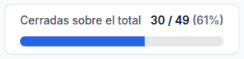
| Progress | percentage_value | value / max (percentage) with a bar |
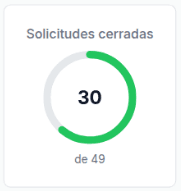
| Circular Stat | stat_circular | A ring with the value over a maximum |
Other single-value widgets: Detailed Stat (stat_detailed), Sparkline Stat (stat_sparkline), Expandable Stat (stat_expandable), Sensitive Stat (stat_sensitive). See Catalog.
Data they read
One row, one column per number:
SELECT
  COUNTIF(estado != 'cerrada') AS abiertas,
  COUNTIF(estado = 'cerrada')  AS cerradas,
  COUNT(*)                     AS total,
  40                           AS meta,
  ROUND(AVG(horas), 0)         AS horas_promedio,
  'Operativo'                  AS estado
FROM `my-project.operations.solicitudes`
Each text field of the widget names a column with a template: {{cerradas}} or {{row.cerradas}}.
Variants
| Variant | Widget | Settings | Query shape | Screenshot |
|---|---|---|---|---|
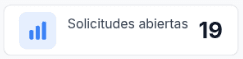
| Plain number | Stat Card | Value {{abiertas}} | abiertas | Plain number |
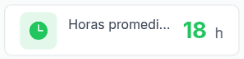
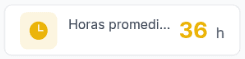
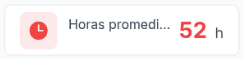
| Green, yellow, red | Stat Card | Value Color Rules: > 48 red, > 24 yellow, <= 24 green; target Text and Icon | horas_promedio | Green, yellow, red |
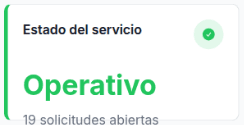
| Text status | Status Card | Value {{estado}}; rule = Operativo → green | estado (text) | Text status |
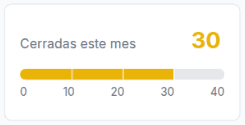
| Goal with thresholds | Progress Stat | Value {{cerradas}}, Target {{meta}}; Thresholds on {{row.cerradas}} | cerradas, meta | Goal with thresholds |
| Part of a total | Progress | Value {{cerradas}}, Max {{total}} | cerradas, total | Part of a total |
| Ring | Circular Stat | Value {{cerradas}}, Max {{total}}, Ring Color | cerradas, total | Ring |
Plain number
Green, yellow, red
Text status
Goal with thresholds
Part of a total
Ring
Main settings
| Widget | Setting | Key | Effect |
|---|---|---|---|
| Stat Card, Progress Stat, Circular Stat | Title, Value, Unit | title, value, unit | Accept templates |
| Status Card | Title, Value, Subtitle | title, value, subtitle | Accept templates. The value shows as text |
| Progress | Title, Value, Max | title, value, max | Accept templates |
| Stat Card | Subtitle | subtitle | Text under the value; accepts Markdown |
| Stat Card | Card Layout: Horizontal / Vertical | cardVariant | Icon on the left or on top |
| Stat Card | Icon, Background, Value Color, Secondary Text | showIcon, icon, iconColor, showBgColor, bgColor, showValueColor, valueColor, … | Fixed colors |
| Stat Card | Go to | showGoTo, goToUrl | The whole card is a link. Accepts templates |
| Stat Card, Status Card | Value Color Rules | valueColorRules.rules[]: operator, value, color, targets | Color by value. A rule beats fixed colors |
| Status Card | Icon | icon | check, warning, clock, truck, … |
| Progress Stat | Target | target | Goal. The bar shows value / target |
| Progress Stat | Thresholds | thresholds: field, applyTo, rules[] | Bar color (Background) and value color (Text) |
| Progress Stat | Bar Color Rules | barColorRules | Bar color by value. Wins over thresholds |
| Progress | Max, Bar Color, Bar Color Rules | max, barColor, barColorRules | Rules compare the percentage or the value (buttons % / Count) |
| Circular Stat | Max, Ring Color, Ring Color Rules | maxValue, ringColor, ringColorRules | Ring from 0 to 100% |
Color rules and thresholds
| Operator | Compares |
|---|---|
=, != | When both sides contain a number, only the numbers are compared (other characters are removed). Otherwise, case-insensitive text |
contains, !contains | Text, case-insensitive |
>, <, >=, <= | As numbers. Strips non-digit characters from the value |
| Type | Evaluation order |
|---|---|
| Value Color Rules | > and >= from highest to lowest value, then < and <= from lowest to highest. =, != and contains keep their list position. Each target (Text, Background, Icon) takes the first matching rule |
| Thresholds (Progress Stat) | List order. The first match wins |
In a Stat Card, rules compare the value’s number. A text value (“OK”) becomes 0. For text states, use a Status Card.
Pitfall: in Thresholds, Evaluate field needs a template ({{row.cerradas}}). When it is empty, no rule applies.
Full example
{
  "componentId": "stat_icon",
  "config": {
    "title": "Horas promedio de atención",
    "value": "{{horas_promedio}}",
    "unit": " h",
    "subtitle": "",
    "cardVariant": "horizontal",
    "showIcon": true,
    "icon": "clock",
    "iconColor": "3b82f6",
    "dataMode": "planner",
    "plannerVariableName": "kpis",
    "valueColorRules": {
      "rules": [
        { "operator": "greater_than", "value": "48", "compareMode": "static", "color": "ef4444", "targets": ["text", "icon"] },
        { "operator": "greater_than", "value": "24", "compareMode": "static", "color": "eab308", "targets": ["text", "icon"] },
        { "operator": "less_than_or_equal", "value": "24", "compareMode": "static", "color": "22c55e", "targets": ["text", "icon"] }
      ]
    }
  }
}
Limits
| Limit | Alternative |
|---|---|
| Read only the first row | One column per number in the query |
| Stat Card turns a non-numeric value into 0 | Use a Status Card for text |
| The value has no thousands separator | In a Status Card, use {{formatNumber total}}. Stat Card, Progress Stat, Progress and Circular Stat read the value as a number: with formatted text (12.500) they show another number or 0 |
| Status Card and Circular Stat drop the static JSON when you save their settings | Use a saved query |
| On narrow widgets, a Stat Card title is cut off | Use a short title or a wider widget |
Last updated on